
Steam Deck Repair : Common Issues, Fixes & Expert Services in Birmingham
The Valve Steam Deck continues to dominate the handheld gaming PC scene in late 2025. With the original LCD model launched in 2022 and the superior OLED version arriving in 2023, it offers unparalleled access to your Steam library on the go. Powered by a custom AMD APU, SteamOS (based on Linux), and features like customizable controls, it runs thousands of games—from indies to AAA titles—smoothly in portable form.
The OLED model, in particular, shines with its vibrant 7.4-inch HDR OLED display, longer battery life (up to 3-12 hours), improved haptics, and faster Wi-Fi. As devices enter their third or fourth year of use, wear and tear is becoming more common. UK owners often face lengthy official RMA processes through Valve, making local professional repairs a smarter, faster choice. This guide explores the Steam Deck’s highlights, prevalent 2025 issues, and reliable repair options.
Why the Steam Deck Remains a Top Handheld in 2025-2026
Both LCD and OLED variants deliver impressive performance:
- Custom AMD Zen 2/RDNA 2 APU for solid 720p/800p gaming at 30-60 FPS.
- Expandable storage via microSD and internal SSD upgrades.
- Ergonomic design with trackpads, gyro controls, and back buttons for precise input.
- SteamOS excellence: Seamless Proton compatibility for Windows games, quick resume, and regular updates.
The 2023 OLED refresh addressed many early complaints—better screen, efficiency, and cooling—making it the go-to model. Community feedback in 2025 praises its versatility for emulation, PC gaming, and even desktop use when docked.
Common Steam Deck Issues Reported in 2025
As units age, forums like Reddit’s r/SteamDeck, iFixit, and Steam discussions highlight recurring hardware and software problems:
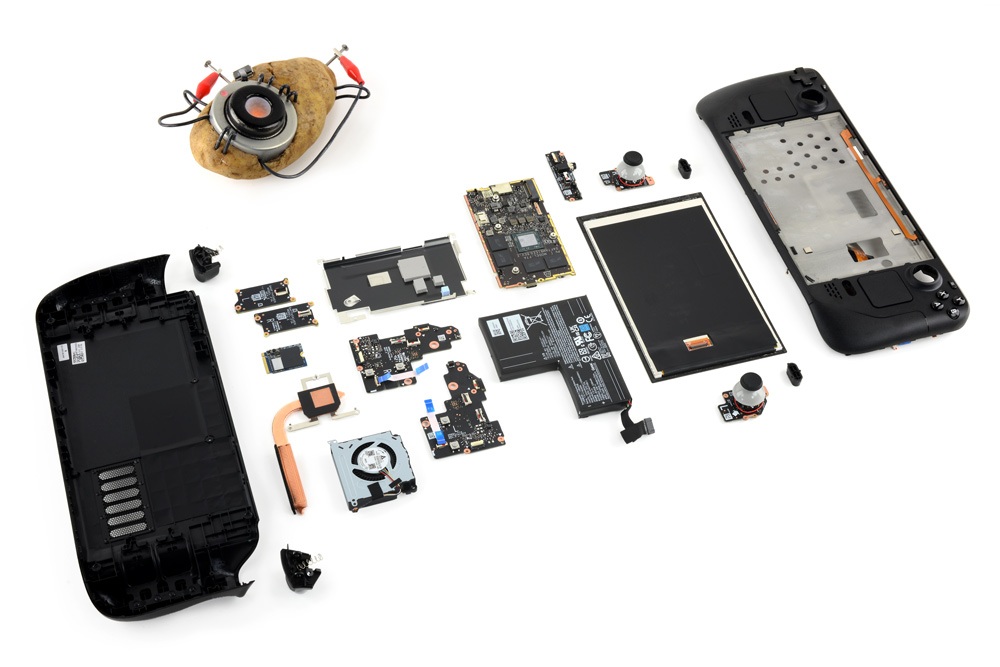
Joystick drift: A top complaint, even on newer units. Analog sticks register unintended movement, affecting aiming in shooters or navigation. Software calibration helps temporarily, but worn potentiometers often need replacement.
Screen damage or faults: Cracked displays from drops are frequent, especially on the anti-glare OLED models. Other issues include black screens (sometimes fixed via BIOS updates), touch unresponsiveness, or lines/artifacts.
Fan noise and overheating: Dust buildup causes louder fans or thermal throttling. In extreme cases, fans fail entirely.
Battery degradation: Reduced playtime, failure to charge fully, or sudden shutdowns. Older LCD models suffer more due to smaller batteries.
Button and trigger problems: Sticky B buttons (common on early OLEDs), unresponsive bumpers, or faulty volume rockers leading to boot loops.
Charging port damage: Loose or broken USB-C ports from frequent plugging/unplugging.Other glitches include audio crackling after sleep, SD card reader failures (mostly fixed in OLED), and occasional crashes/freezes tied to updates.
These aren’t affecting every unit, but heavy daily use accelerates wear. DIY fixes via iFixit guides are popular, but risks include voiding warranty or further damage.
The Value of Professional Repair in the UK
Valve’s official RMA can take weeks or months for UK users, with mixed experiences reported in 2025. Third-party specialists provide quicker turnaround, genuine/iFixit-compatible parts, and warranties on work—often at lower cost.
Experts handle delicate tasks like motherboard diagnostics, soldering ports, or full disassembly without bricking your Deck.
Premier Steam Deck Repair: Any Gadget Repair in Birmingham
For Steam Deck repair in the UK, Any Gadget Repair offers dedicated expertise tailored to Valve’s handheld. Their specialised page covers LCD and OLED models, addressing:
- Joystick drift repair or replacement
- Screen replacements (cracked, black screen, touch issues)
- Battery swaps for improved runtime
- Charging port fixes
- Fan cleaning/replacement to reduce noise and heat
- Button/trigger repairs
- Software resets and diagnostics
With nationwide mail-in service, free quotes, rapid repairs, and a guarantee, they’re perfect for gamers avoiding long waits. Contact them at 0121 554 4826 or check their Steam Deck repair page: https://www.anygadgetrepair.co.uk/steam-deck-gaming-console-repair.html.
Tips to Maintain Your Steam Deck and Avoid Repairs
- Calibrate controls regularly in Game Mode.
- Use a protective case and screen protector.
- Clean vents/fans periodically; avoid dusty environments.
- Limit TDP in demanding games for cooler operation.
- Update SteamOS promptly but monitor for bugs.
- Store at partial charge if unused long-term.
Final Thoughts:
Keep Your Steam Deck Gaming StrongIn 2025, the Steam Deck—especially the OLED—is still the king of portable PC gaming. But issues like drift, screen damage, or battery wear can interrupt the fun. Skip the hassle of official channels and choose professional repair for quick, reliable results.If your Steam Deck needs expert attention in the UK, reach out to Any Gadget Repair today. Get back to your library without delay!
Related Posts
-
 Expert Console Repair Services in Birmingham: Any Gadget Repair
-
 PlayStation Portal Repair : Common Issues, Fixes & Expert Services in Birmingham
-
 Expert Console Repair Services at Any Gadget Repair: Keep Your Gaming Gear in Top Shape
-
 Comprehensive Guide to Console Repairs: Xbox, PlayStation, Nintendo, and More
About The Author
